How Smarter Information Sharing Can Improve Collaboration and Coordination Across Disciplines
The Challenge of Connected Project Information:
A structural model changes, but the services team is still coordinating against an earlier version.
A fabricator needs details for one part of the building yet receives an entire model to work through.
These are familiar challenges on construction projects. Information exists, but getting the right information to the right people, in a form they can use, is not always straightforward.
With different disciplines working across multiple software platforms, sharing files is only part of the solution. Teams also need to understand what has changed, which information is relevant, and how it fits alongside the work of others.
When those connections are missing, valuable time is spent checking versions, preparing exports and clarifying details rather than resolving design issues. The result can be avoidable rework, coordination delays and reduced project efficiency.
A more connected approach starts with sharing the information a task actually requires, rather than treating every exchange as a whole-model handover. Autodesk Data Exchange supports this approach by making selected model geometry and properties available across supported applications.
Bringing those exchanges into Model Coordination takes that connection a step further by allowing teams to review shared information alongside other project models within a coordinated environment.
What is Autodesk Data Exchange?
Autodesk Data Exchange is a cloud-based method for sharing selected model data without distributing an entire design file. Teams can share only the geometry and properties required for a specific task, such as a stair core, plant room or fabrication package, ensuring collaborators receive relevant information without unnecessary model content.
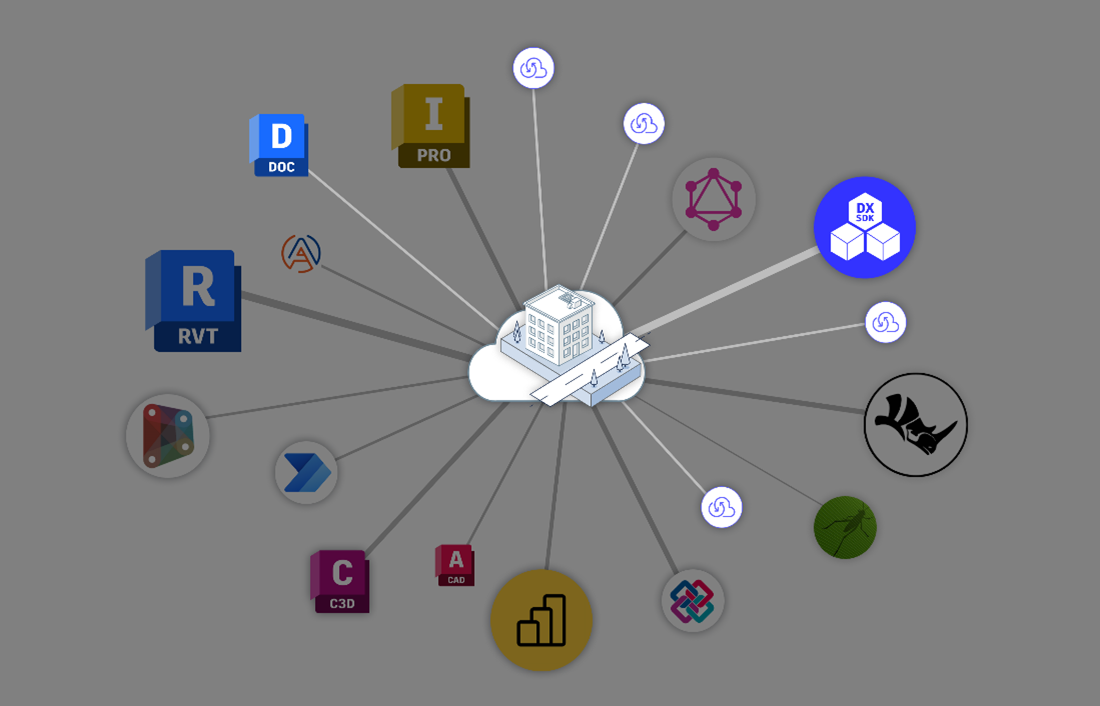
Through supported connectors, this information can be used across Autodesk and third-party applications, helping teams work with shared data in the tools they already use. Exchanges can be updated as source models change, with the update process varying depending on the connector and workflow.
The benefit is straightforward: less unnecessary data handling and more targeted information sharing.
Consider a steel fabricator who only requires structural steelwork associated with a plant room. Traditionally, this may involve receiving and processing a much larger building model. With Data Exchange, only the relevant geometry and associated properties can be shared, allowing the team to focus on the information needed to complete their task without the overhead of managing additional model content.
Bringing Data Exchange into Model Coordination:
Autodesk Model Coordination provides a web-based environment where teams can view aggregated models, perform automated clash detection and manage coordination issues without specialist desktop software.
With Data Exchange now supported, project teams can bring exchanges directly into coordination workflows alongside other supported model formats. This creates a more connected process, allowing teams to move seamlessly from sharing information to reviewing and validating it within the same environment.
Two key capabilities are introduced:
Aggregation: Data Exchanges can be incorporated into coordination views, combined with other supported formats, saved as Snapshots and shared through Autodesk’s data management environment. They also work with tools such as Object Table, Object Colours and Transform, enabling teams to review exchanged information alongside other project models.
Clash Detection: Data Exchanges created from Revit and Inventor can participate in automated clash detection workflows. Clashes can be tracked as issues and retain their history as exchanges are updated, supporting continuity throughout the project lifecycle.
While Data Exchanges are not traditional files but data containers linked to source information from platforms such as Revit, Inventor, IFC and Tekla Structures, the overall direction is clear: coordination is becoming more connected, more targeted and less dependent on transferring large model files between teams.
What Does This Mean for Project Teams?
For project teams, the biggest shift is that coordination no longer needs to rely entirely on whole-model handovers. Instead, teams can bring the specific geometry and properties required for a task into Model Coordination, review them alongside other disciplines and manage issues in the same environment.
More focused coordination
Reviewers can work with the specific area of interest, such as a stair core or plant room, rather than navigating through an entire project model. This helps teams spend more time identifying and resolving issues and less time searching for relevant information.
Improved collaboration across platforms
Information from Revit, Inventor and other supported sources can be coordinated together, helping bridge the gap between design, fabrication and manufacturing teams that may use different software tools.
Continuity as models evolve
Because clash information can remain associated with an exchange as it is updated, teams can maintain visibility of issues throughout design development rather than restarting coordination processes with every new version.
Better shared context
Aggregated views and snapshots can be shared across project teams, helping everyone work from the same coordinated information when reviewing issues and making decisions.
To realise these benefits, teams should establish clear responsibilities for creating and maintaining exchanges, ensure they are using current connectors and understand which workflows are supported within their project environment. A small amount of planning can help ensure information remains both targeted and coordination-ready.
Looking Ahead:
As projects become larger and more complex, successful coordination depends on more than simply exchanging files. Teams need access to the right information, at the right level of detail and at the right time.
The combination of Data Exchange and Model Coordination represents a move towards more connected workflows, where project data can be shared with greater purpose and coordinated in context.
By bringing Data Exchange and Model Coordination together, Autodesk is helping teams move beyond traditional file-based workflows towards a more connected approach to project delivery. The ability to share targeted information, coordinate it in context and maintain visibility as designs evolve helps teams collaborate more effectively, resolve issues earlier and make better-informed decisions throughout the project lifecycle.
Testimonials
Looking forward to seeing the Draftech quality once again with this project.
Hayri Doganci Climatech
Just taking a moment to thank you for your efforts on the ECI. What we produced in a short period was fantastic
Martin O’Donovan Envar Engineers
Fantastic team to work with. Thank you to everyone at Draftech for your support on this fast-paced Tier 1 project. The collaboration with Precision BIM was a great success, and we look forward to working together again soon.
Dion Barker Precision BIM
Draftech stands out through their collaborative approach from the outset, excellent value for the services they provide, and strong understanding of client BIM project information requirements. They consistently align with project expectations and deliver practical, high-quality outcomes that support successful project delivery.
Brendan Meikle ADCO
Thanks very much for your support with the As-Built Models. It’s been really refreshing to work with someone as self-sufficient and diligent as you.
Brenton Sonego ADCO
Expedient and efficient drafting with professional-level service.
Philip Finch Envar Engineers
Thank you for all your efforts on our projects; they have been an invaluable contribution to their success. We look forward to working with you on future projects.
Ian Ferguson MPM Group
Jess and Karl at Draftech were amazing. The communication from the start was prompt, and the entire process was extremely easy. We needed their knowledge on Air Schematics, and they had made one up for our buildings that we service. Thanks so much, and we will be using you guys in the future. Cheers, Air Control Australia.
Greg Colebrook AirControl Australia
With Draftech’s thorough understanding of building services modelling and close attention to detail, Forth has been afforded the opportunity to outsource some of our BIM projects with absolute confidence in the accuracy of the final product.
Gary Murdoch Forth Consulting
Very professional and efficient organization. Delivered a great product to a tight deadline.
ACE Power
Karl and the team are very professional and have a vast knowledge of BIM coordination.
Dwayne Willaims Babinda Electrics
We had multiple large projects with tight deadlines and needed a company we could trust. The teams delivery, attention to detail and understanding of what is being designed is always executed to a high standard.
Martin O’Donovan Envar Engineers
Draftech offered a flexible and reliable approach to working collaboratively with our team. They met our expectations and quality requirements and also offered up new ideas.
Draftech have proven to be a valuable and trustworthy resource and we will continue to work with Draftech on other projects.
Simon Marsden Umow Lai
Draftech is different from others in the professionalism and features they provide.
The ability to walk through projects in real time online provides invaluable insight into problem areas and helps provide an efficient resolution on the spot without many phone calls, emails and the necessity for us to paw through countless drawings to understand the issues.
Todd Morris Manager - Air mech
Draftech were put forward to FIP Electrical as the solution to Coordinate, Model, carry out clash detection, provide Electrical Services Shop Drawings, as built documentation and completed electrical model.
Simon Thorpe FIP Electrical
In close collaboration Draftech set up all our systems and model deliverables. In this process Draftech have proven to be a valuable resource for us and demonstrated commitment, understanding and professionalism.
David Skelley DJCoalition
Draftech’s attention to detail and proactive nature throughout the project assisted us in identifying issues before becoming evident on site, saving us both time and unexpected costs.
Matt Payne PJM Engineering Services
They delivered very high quality Revit models and associated 2D documentation at key milestones, working to a tight budget and in strict accordance with the Architects’ BIM requirements.
Peter Thomas Geoff Hesford
We found Draftech’s work to be of high standard and the team delivered exactly as agreed, in fact, when we considered the project complete, Draftech put further resources into the project as they were not satisfied.
John Johnson Beca
Engaging Draftech during design gave us the tools to make smart decisions.
Hansen Yuncken Design Manager - Michael Harkins
The drafting service is timely, reliable and fit for purpose for the built environment.
Peter Harvey Harvey Industries
Draftech stands apart from other drafting services that we have previously used in their attention to detail and ability to adapt to the individual client’s requirements.
Doug Holt McCaig Aircon
I can confidently recommend Draftech as a solid and reliable supplier, and experts in their field. I look forward to working with them again in the near future.
Chris Behan Norman Disney & Young
After seeing the benefits Draftech provided us on the Townsville Hospital Redevelopment we have set up a relationship with Draftech and intend to continue to use their BIM knowledge and skills for our future projects.
Brad Lund Energy Power Systems
Draftech has no competition as they are in a class of their own.
John Boyes Babinda Electrics
Draftech Developments Drafting and Design Capabilities, in conjunction with their outstanding level of Client service and support has provided great solutions to our engineering and Drafting Design portions within our Gorgon Barrow Island Project.
Aaron Hazelton Applied Electro Systems Pty Ltd
Draftech set up necessary systems and workflows very quickly, but also setup auditable estimating and weekly cost tracking processes that we utilised, requiring little maintenance.
TOM PURDON MPM GROUP